13 November 2025
Wall Frame RGB Remote Control: User Guide
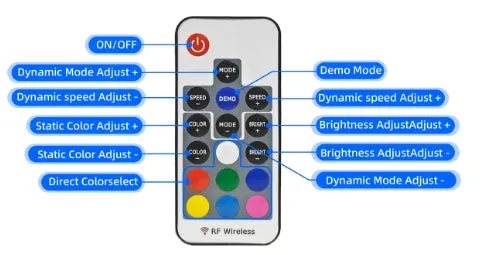
How do I set each display panel to a different color?
Short answer: Pair each remote control with its matching RGB frame one-to-one. That's what lets each panel run its own color independently.
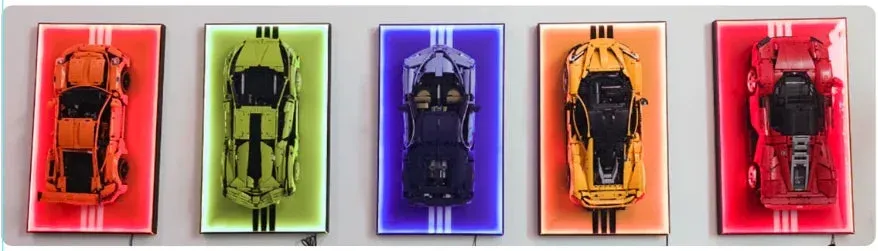
Note: if you skip the one-to-one pairing, the remote works as a universal control for every frame at once.
Pairing steps:
(1) Turn off all display panels first.
(2) Turn on only the one frame you want to pair. Press and hold the button on its matching remote for 3 seconds until the LED strip flashes three times. That confirms the pairing worked. Switch that frame off again right after.
(3) Repeat this for every frame, one at a time. Once each one is paired, turn all frames back on together and the one-to-one pairing is complete.
(4) To clear the one-to-one pairing on all frames at once: turn every frame on, then press and hold the button for 3 seconds until the LED strip flashes three times, confirming it's been undone.
Power supply must be at least 5V. Because USB power supplies follow a fixed standard, you don't need to worry about excess output voltage damaging the LED strip.
(1) A power bank or phone charger works fine as a power source.
(2) You can also power it directly from a power strip that has a USB port.
(3) We don't recommend a battery box, since batteries hold limited power and can drop below the voltage the strip needs. Under 5V, expect odd lighting behavior, an unresponsive remote, or delayed reactions. Too much voltage, on the other hand, can damage the strip.
Contact us
Run into any issues while setting this up? Reach out to our customer service team and we'll help you sort it out.